 Alternative to Notion
A free Notion alternativeyou keep, offline
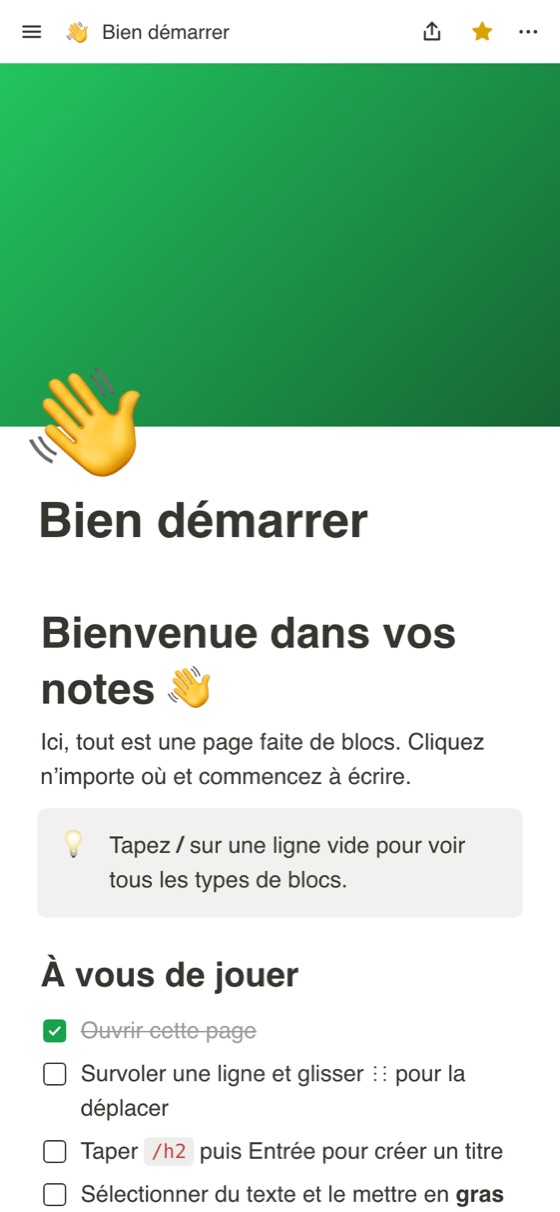
Carnet gives you the part of Notion most people use alone: a tree of nested pages made of blocks, the / menu, to-dos, toggles, tables and boards. It opens in your browser with no account and keeps working with Wi-Fi off, because your notes never leave your device.
 CarnetEvery note, list and doc in one nested page tree.
Free, with no account. Pick its name and colour first if you like.
- Free forever
- No account
- Works offline
- Interface in French
- Unlimited pages
Carnet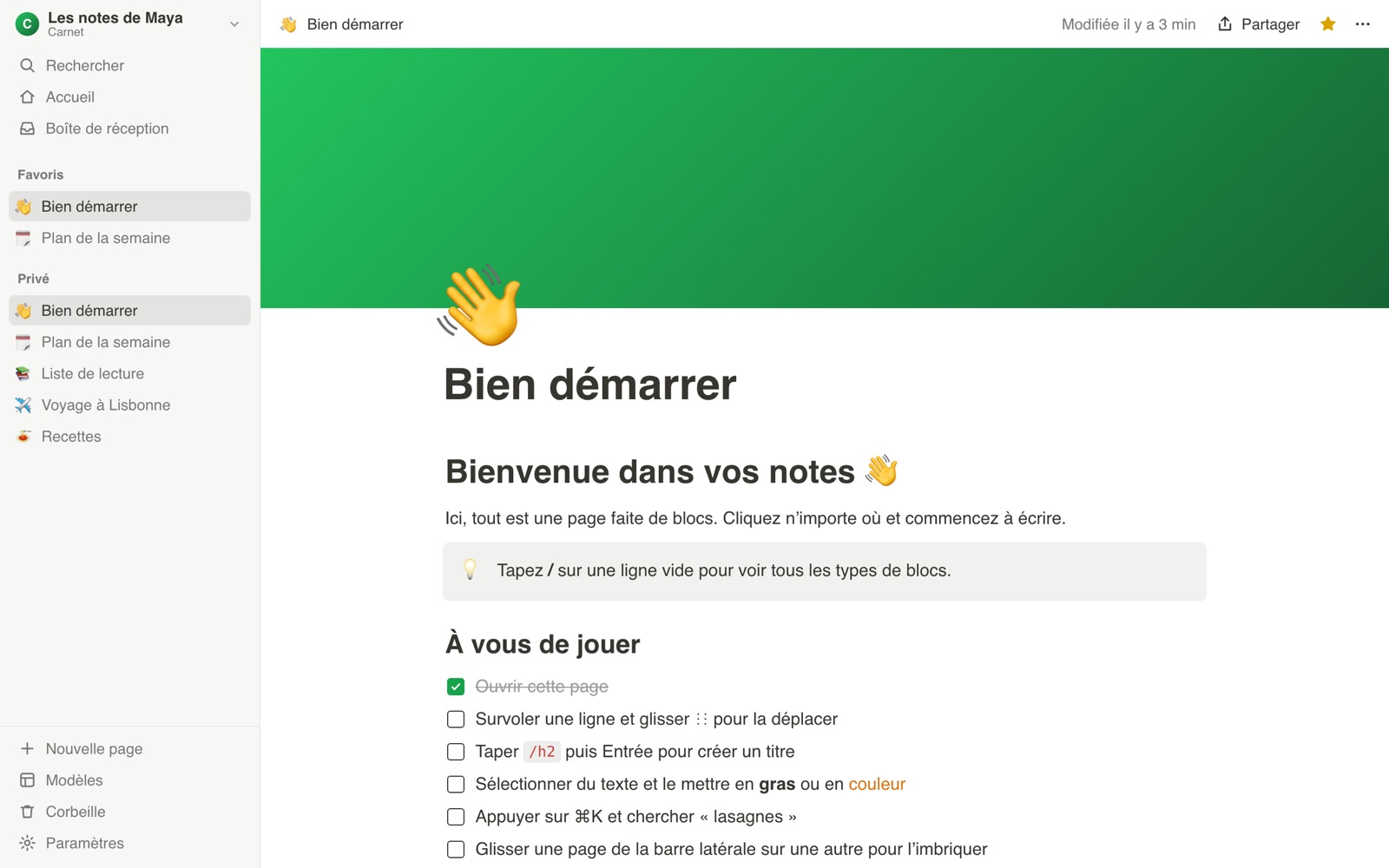
Notion and Carnetside by side
| What you need | Notion | Carnet |
|---|---|---|
| Nested pages in a sidebar tree | Yes | Yesunlimited depth, drag to reorder |
| Blocks, / menu and Markdown shortcuts | Yes | Yes16 block types, # - [] > shortcuts |
| Tables and boards | Yesfull databases with relations, formulas, timelines | Partlytable and board views, 7 property types, one filter and sort per view |
| Templates, favourites, trash with restore | Yes | Yes |
| Works with no internet | Partlydesktop and mobile apps only; on Free you pick pages one by one | Yesin any browser, every page, once opened |
| Account needed | Required | None |
| Where your notes live | Notion's cloud | your browser, on your device |
| Real-time collaboration and comments | Yes | No |
| Sync between your devices | Yes | Nomove a JSON backup file instead |
| AI writing | YesNotion AI, on paid plans | No |
| Interface language | English and several other languages | French for now |
| Price for one person | $0 Free, $10–12 a month for Plus | $0, forever |
What Carnet does not do
- No sharing, comments or real-time editing with other people: Carnet is a notebook for one.
- No automatic sync between your laptop and your phone. You move your workspace with one JSON backup file.
- No relations, rollups, formulas, calendar or timeline views in databases.
- No embeds (YouTube, Figma, files). Images and links only.
- No AI. Everything Carnet does runs on your device.
- The interface is in French today. Your notes can be in any language.
What Notion costsand what Carnet costs
Notion is free for one person, with limits. Teams and heavy users pay per member.
| Plan | Price | What you get |
|---|---|---|
| Free | $0 | Unlimited blocks for one member, 5 MB uploads, 7-day page history, 10 guests |
| Plus | $10 a month, billed yearly | Unlimited uploads and page history of 30 days. About $12 billed monthly, according to third-party price trackers |
| Business | $20 a month, billed yearly | Notion AI included, SAML SSO, private teamspaces |
Source: notion.com, checked on 16 October 2026. Prices are per member. The monthly-billing figure is not shown on Notion's page and comes from third-party trackers.
$0No plan, no trial, no card, nothing to cancel.
Carnet has no member count. Install it on as many devices as you like.
Why people leave Notion
Offline is limited
Notion's offline mode works in the desktop and mobile apps, not in a browser tab. On the Free plan you mark pages for offline one at a time; automatic download is a paid feature.
Source: notion.com
Prices went up with AI
When Notion AI was folded into the Business plan in 2025, its price rose from $15 to $20 per member a month.
Source: usagepricing.com
Everything sits in someone else's cloud
A Notion account is required and every page is stored on Notion's servers. People who keep private notes, journals or client details often want them on their own device instead.
Source: notion.com
Before you switch
Is there a free Notion alternative that works offline?
Yes. Carnet runs entirely in your browser and stores your pages on your device, so after the first visit it opens and saves with no internet at all, on a computer or a phone.
Do I need an account to use Carnet?
No. There is no sign-up, no email and no password. You open the app and start writing.
Can I import my Notion pages?
Partly. Export a page from Notion as Markdown, copy its text and paste it into Carnet: headings, lists, to-dos and quotes become blocks. There is no one-click import of a whole Notion workspace yet, and databases come across as text.
Where are my notes stored, and how do I back them up?
In your browser's storage, on your device. Nothing is uploaded. Use Settings, Export workspace to download one JSON file, and Import workspace to restore it on another device. Clearing your browser data deletes your notes, so keep a backup.
Can I export my notes from Carnet?
Yes. Any page exports as Markdown or HTML, and the whole workspace as one JSON file.
Is Carnet really free?
Yes. There is no paid plan, no trial and no limit on pages. Labclone earns money from custom builds for businesses, not from the free apps.
Keep CarnetFree, on your devices
Install it on your computer or phone in a few seconds. It is yours: no account, no subscription, no data sent anywhere.
Free, with no account. Pick its name and colour first if you like.
Notion is a trademark of its owner. Labclone is not affiliated with it. Carnet is original software with its own name and design.
Other apps you can stop renting
 RectoAlternative to Quizlet
 PaperkitAlternative to Acrobat
 FernlyAlternative to YNAB
 PaperlaneAlternative to FreshBooks
 LapseAlternative to Toggl Track
 CursusAlternative to Resume.io
 FootnoteAlternative to WiseStamp
 KindlingAlternative to Habitify
 PagelightAlternative to Day One
 ParlaAlternative to Duolingo
 Mot du jourAlternative to Wordle